Retail Stores & Chains

Drive in-store sales with dynamic promotional displays.

Replace static window posters and printed signage with screens that update remotely in seconds. Promote today's deals, new arrivals, loyalty rewards, and seasonal campaigns - and change them across every location without printing or shipping anything.
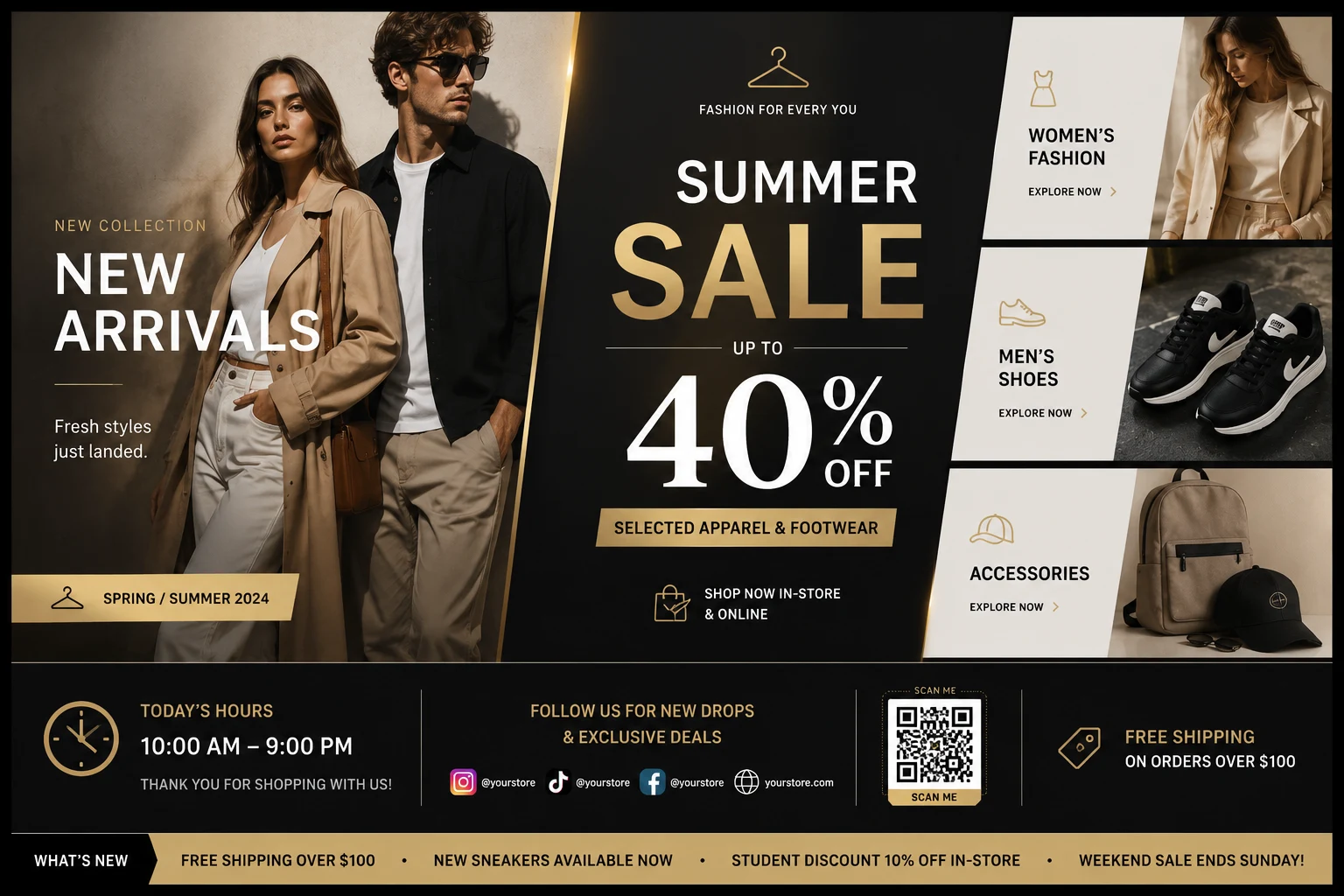
Retail digital signage - fashion promo board with sale promotion, category cards, and store hours

What plays on retail screens

Three types of content - all managed from one place.

Retail screens serve three jobs at once: selling, building the brand, and informing customers. Atracast handles all three without separate software or hardware.

Promotions & Sales

Flash sales, weekend deals, clearance events, and loyalty point promotions. Set a start and end time - the screen switches automatically.

  • Flash sale countdowns
  • Weekly deal boards
  • Clearance & BOGO offers
  • Loyalty reward reminders

Brand & Product Content

New arrivals, seasonal lookbooks, product videos, and campaign imagery. Upload once and it's on every screen at every location simultaneously.

  • New collection lookbooks
  • Product highlight slides
  • Brand campaign videos
  • Seasonal creative themes

Operational Info

Store hours, social media handles, return policies, and staff announcements - always current, configured once, never outdated.

  • Live open/closed indicator
  • Social media QR codes
  • Return & exchange policy
  • Staff announcements

What retail teams use it for

Every type of promotion, on every screen.

Flash Sales

Schedule a sale to start and end at an exact time. Screens switch automatically - no manager needs to log in to turn it off.

Seasonal Campaigns

Design seasonal content in the slide editor once, schedule it with a start and end date, and it runs across all locations without further action.

Brand Compliance

The content approval workflow means nothing goes live without an authorized admin verifying a 6-digit email code - protecting brand standards across all locations.

Multi-Location Sync

One campaign, every store. Design once and push to 5 or 50 locations simultaneously from a single dashboard action.

New Arrivals

Upload a product photo or short video and it's on every screen within 30 seconds. Faster than printing and delivering a poster.

Background Music

Add ambient music from your media library. It plays continuously and automatically ducks when a video ad plays, then restores.

Built-in retail widgets

Widgets designed for retail - no setup required.

Social Media Widget

Turn every screen into a follower magnet. Show your Instagram, TikTok, Facebook, YouTube, and 8 other platforms directly on your in-store displays. Three styles:

  • Bar - Branded icon strip with handles - sits at the bottom of any layout
  • Card - "Follow Us" panel with a grid of platform icons and usernames
  • QR Cycle - Cycles each account with a scannable QR code - one tap, instant follow

Store Hours Widget

Set your Monday–Sunday schedule once and it's accurate every day - no one logs in to update the hours display. Two display modes:

  • Today Card - Shows today's hours with a live Open / Closed indicator dot - ideal for window and entrance screens
  • Full Week - Lists all seven days with today highlighted - useful in waiting areas where customers want the full picture

Supports multiple locations and timezones. Each store gets its own hours record.

Platform features

Every tool your retail screens need - all included.

No third-party integrations. No add-ons. Every feature below ships with Atracast.

Slide Designer

Promotional slides for flash sales, new arrivals, and seasonal campaigns - no design tools needed.

Background Music

Store ambiance from your audio library. Auto-ducks on promo videos, then restores seamlessly.

Product Videos

Loop brand campaign videos or product demos on any screen as full-screen playlist items.

Lookbook Slides

New collection showcases, product highlights, and seasonal lookbooks from your media library.

Store Hours Widget

Live Open/Closed indicator with your store hours - configured once, correct every day.

Scheduled Campaigns

Set a sale to start and end at exact times automatically - no one logs in to flip content.

Content Approval

Brand compliance review via 6-digit code before any content appears on store screens.

Social Media Widget

Show your Instagram, TikTok, Facebook, and more as a bar, card, or QR cycle on any screen.

Key capabilities

  • Promotional campaign slides with scheduled start/end dates
  • Sale price and product highlight layouts
  • Seasonal and event-based content scheduling
  • Multi-location campaign push - 1 action, all stores
  • Content approval workflow for brand compliance
  • Drag-and-drop slide designer for custom layouts
  • Social media overlay - bar, card, or QR cycle
  • Store hours widget with live Open/Closed indicator
  • Background music with smart video ducking
  • Emergency alert push to all screens instantly
  • Offline playback - screens keep running if internet drops

How retailers use it

A retail chain's marketing team designs a summer campaign in the slide editor, submits it for approval, and the regional manager verifies it with a 6-digit code. It goes live across 40 stores simultaneously - no USB drives, no on-site visits.

A flash sale is scheduled to start at noon and end at 6pm. The screens update automatically at both times - no one has to log in to switch the content.

A boutique clothing store adds its Instagram QR code as a social overlay on every screen. Customers scanning it while browsing convert to followers without any additional effort from staff - the QR rotates through every platform automatically.

Dashboard

Design, schedule, and push in one place.

The Atracast dashboard runs in any browser. No software to install, no designer needed - your team is up and running in minutes.

Dashboard screenshot coming soon

FAQ

Common questions

How do I display sale promotions on my store screens?

Design a promotional slide in the slide editor or upload a media file, add it to a playlist, and push it live. Changes appear on every screen within 30 seconds. No USB drives, no on-site visits.

Can I schedule promotions to start and stop automatically?

Yes. Set a start date and end date on any schedule. The promotion goes live at the start time and stops automatically at the end - no manual action required at any location.

How does the content approval workflow work?

An editor creates and submits content for review. The admin receives a 6-digit code by email. Content only goes live after the admin enters that code - nothing appears on screens without explicit sign-off, protecting brand compliance.

Can I push different promotions to different store locations?

Yes. Each screen is assigned to a device group. You can target promotions to specific locations, regions, or all stores simultaneously from one dashboard.

What hardware do I need for in-store digital signage?

Any screen with a modern web browser - smart TVs, commercial displays, Amazon Fire Sticks, or Raspberry Pi. No proprietary media player hardware required.

Can I display my social media handles on in-store screens?

Yes. The Social Media widget lets you show any combination of Instagram, Facebook, TikTok, X, YouTube, LinkedIn, and 6 other platforms as a persistent overlay. Choose a bar strip, a "Follow Us" card, or a QR-code cycle that customers can scan to follow you instantly.

Can I show different content at different times of day - like morning vs. afternoon promotions?

Yes. Set schedule rules with start and end times so morning content plays during opening hours and evening promotions take over at a set time. Everything switches automatically with no one touching the screen.

What happens if my store loses internet connection?

Atracast screens cache the last active playlist locally. If the connection drops, the screen keeps playing the last content it received. When connectivity restores, it re-syncs automatically within the next 30-second heartbeat cycle.

From the blog

Related reading

View all posts →

Start promoting smarter today.

Free to get started. No credit card required. Up and running in 5 minutes.