Gyms & Fitness Centers

Class schedules, trainer info, and live updates on every screen.

Publish your full weekly class program from the dashboard and it appears live on lobby, studio, and floor screens - no design work, no USB sticks, no on-site visits. Toggle any class active or inactive with one click.
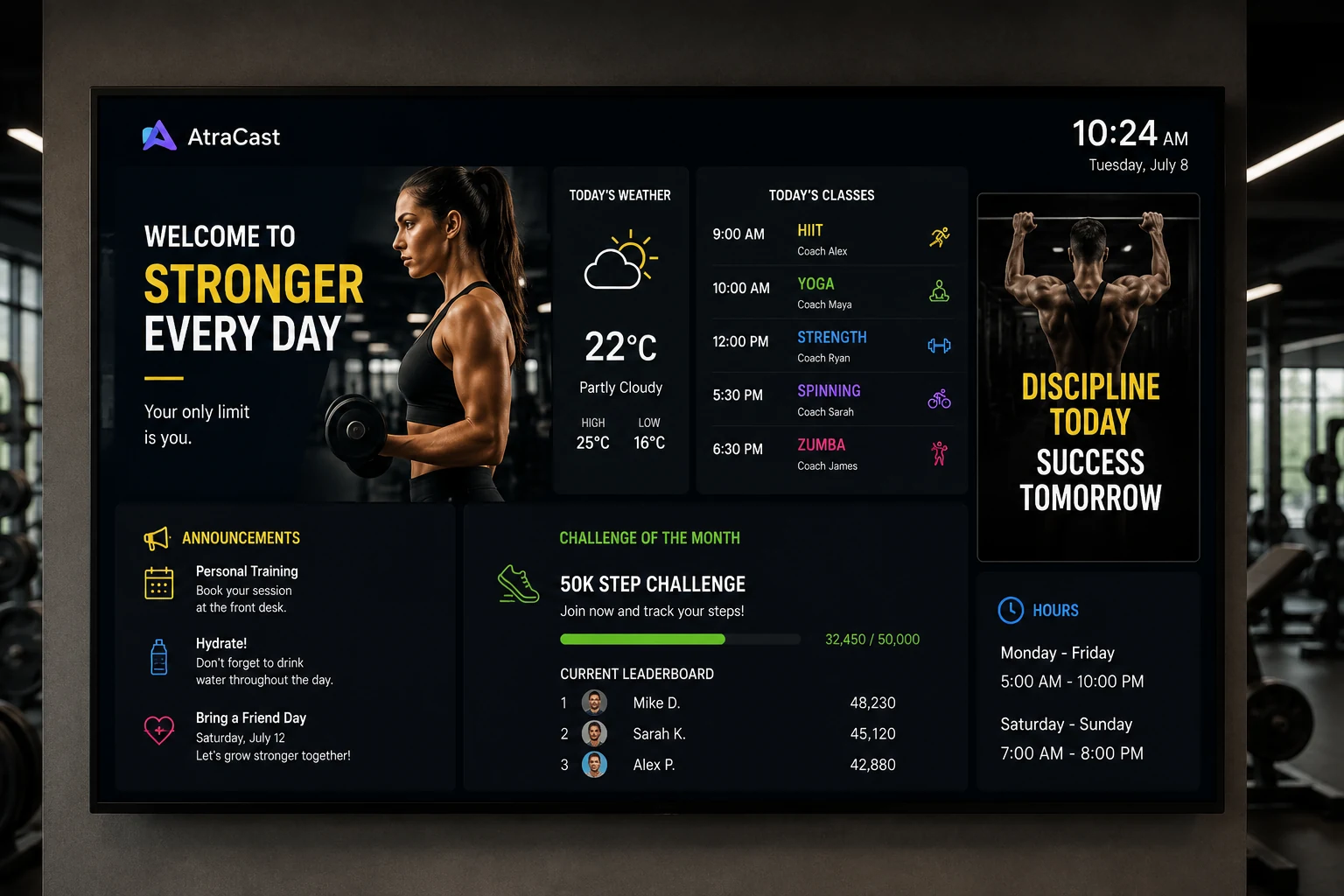
Atracast digital signage for gyms showing class schedule, weather, and challenge leaderboard

Three Display Modes

The right view for every screen in your facility.

Use Today mode at the entrance, Week mode in the lobby, and Day Scroll on studio screens - all from the same location setup.

Today

Shows all classes scheduled for today, sorted by start time. Each card has a color accent bar, class name, trainer, and time. Clean and scannable at a glance.

Full Week

Seven-column grid with today's column highlighted. Lets members plan their week at a glance from the lobby screen.

Day Scroll

Automatically cycles through each day on a configurable timer with a progress bar at the bottom. Great for studio entrance screens.

Platform features

Every tool your gym screens need - all included.

No third-party integrations. No add-ons. Every feature below ships with Atracast.

Gym Schedule Widget

Class board with Today, Week, and Day Scroll modes. Color-coded cards with trainer name, time, and capacity.

Background Music

Workout playlists and lobby ambiance. Shuffle mode, volume control, auto-ducks on any video item.

Video Backgrounds

Loop training highlight reels or class promo clips as full-screen backgrounds on any playlist item.

Image Gallery Slides

Trainer profiles, equipment showcases, transformation stories - from your media library to any screen.

Store Hours Widget

Shows your gym's open/closed status and hours automatically every day based on your weekly schedule.

Scrolling Ticker

Last-minute cancellations and studio announcements as a scrolling overlay on any screen.

Slide Designer

Branded membership campaigns, new class announcements, and seasonal promotions - no design tools needed.

Emergency Override

Instant closure notices or safety alerts pushed to every gym screen simultaneously in seconds.

Key capabilities

  • Built-in Gym Schedule module - no slide design needed
  • Today, weekly, and day-scroll display modes
  • Trainer name, class times, and color-coded cards per session
  • One-tap active/inactive toggle per class
  • One-click class duplicate to copy sessions across days
  • Capacity display per class
  • Time-of-day playlist switching (morning / afternoon / evening)
  • Membership and promotion slides between schedule views
  • Emergency announcements pushed instantly to all screens

How gyms use it

A gym's lobby screen shows today's classes in order with each trainer's name - updating automatically as the day progresses. Members see which class is next without asking at the front desk.

A studio entrance TV cycles through the full week's schedule day by day on a 10-second timer. Late afternoon shows a different playlist highlighting evening classes and a "try a new class" promotion.

A fitness chain promotes its "New Year Challenge" campaign across all locations from January 1st through January 31st, set to auto-stop on February 1st - no one logs in to turn it off.

Dashboard

Add and manage classes in seconds.

Dashboard screenshot coming soon

FAQ

Common questions

How do I display my gym's class schedule on lobby screens?

Add a gym location in the Atracast dashboard, enter your classes with trainer names, times, and colors, and the schedule appears live on every registered screen within 30 seconds. No design work, no USB drives, no IT involvement.

Can I show different views on different screens?

Yes. Today mode shows just today's classes sorted by start time. Week mode displays a full 7-day grid with today highlighted. Day Scroll auto-cycles through each day on a configurable timer. Each screen widget can have a different mode independently.

How do I mark a cancelled or inactive class?

Toggle the class inactive with one click in the dashboard. The change appears on every board within 30 seconds - members see the update before they arrive at the gym.

Do I need special hardware to run digital signage in my gym?

No. Atracast runs on any device with a modern web browser - smart TVs, Amazon Fire Sticks, Raspberry Pi, Chrome sticks, or any browser-capable display. No proprietary media player hardware required.

Can I show promotional content between class schedule views?

Yes. The gym schedule is a playlist item. You can add promotional slides, videos, or membership offers in the same playlist and they'll cycle between schedule views on whatever schedule you set.

From the blog

Related reading

View all posts →

Get your class schedule on every screen today.

Free to get started. No credit card required. Up and running in 5 minutes.