Property Management
Managing digital signage across multiple properties is complex. Atracast's multi-location management and condo board module lets you publish building-specific announcements or push system-wide notices across your entire portfolio - from one dashboard.
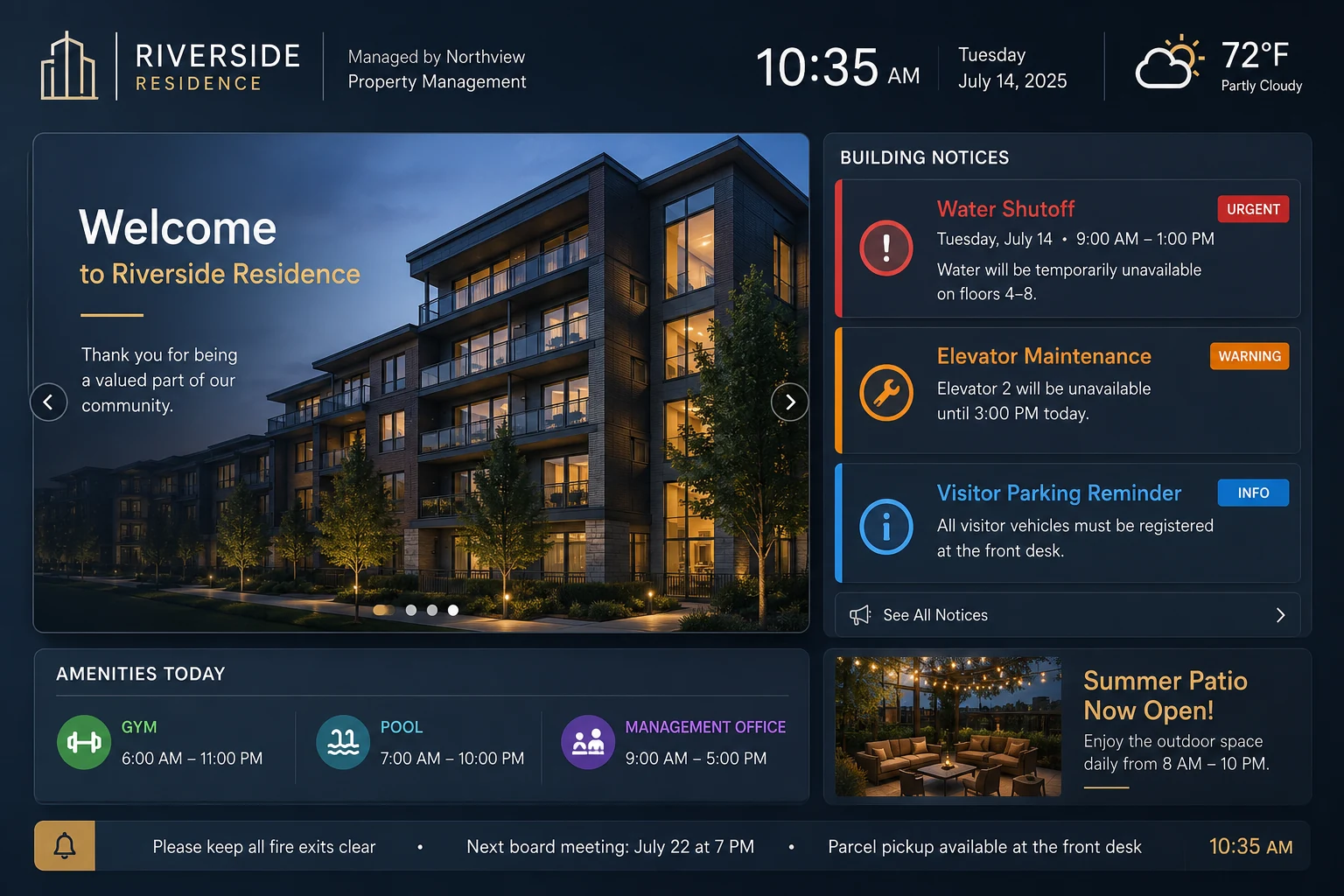
What property managers display
Scheduled maintenance, elevator outages, water shutoffs - posted with an expiry date so they disappear automatically when the work is done.
Push an urgent message to every building's lobby and elevator screens simultaneously within 30 seconds - no phone calls, no on-site visits.
AGM dates, parking rule reminders, move-in/move-out schedules - posted to the specific building that needs it without bothering other properties.
Portfolio admins see all buildings. Building admins see only theirs. Role-based access enforced at every API endpoint.
Set an end date on every announcement. It disappears from the screen automatically - no one logs in to clean up expired notices.
Design branded background layouts in the slide designer and overlay announcement content - lobby screens that match the property's visual identity.
Platform features
No third-party integrations. No add-ons. Every feature below ships with Atracast.
Building-specific announcements with Info/Warning/Urgent levels and auto-expiry on schedule.
Amenity hours per building - gym, pool, laundry room - configured once, correct every day.
Display the current time on lobby screens - combined with announcement content.
Building news, renovation updates, and community photos as styled slides on lobby screens.
Loop building showcase or community welcome videos as branded lobby screen backgrounds.
Branded lobby screens matching the building or portfolio identity - custom colors and fonts.
Community news and weather headlines as a scrolling banner below announcement content.
Portfolio-wide alerts pushed to every screen at every building simultaneously in seconds.
Key capabilities
How property managers use it
A property management company with 12 buildings needs to notify all residents of a scheduled maintenance window. One announcement is created and pushed to all buildings' lobby screens simultaneously. Each building's own manager can still post building-specific notices independently.
A building administrator marks a notice "Urgent" and it appears on every lobby and elevator screen in that building within 30 seconds - without needing portfolio-level access. Role-based permissions mean each admin only sees what they need.
FAQ
Each building gets its own announcement board in Atracast. A portfolio-level admin can publish to all buildings simultaneously, while individual building admins can post independently to their own screens. All from a single dashboard login.
Yes. Use the emergency push from the Devices dashboard to send an urgent alert to every screen across all buildings simultaneously. It preempts any scheduled content and appears within 30 seconds.
Each announcement has an urgency level: Info (blue), Warning (amber), or Urgent (red). The TV client renders a color-coded urgency bar on every announcement so residents can immediately identify the severity without reading the full notice.
Yes. Set an expiry date on any announcement and it disappears from all screens at that time - no one needs to log in to remove it. Maintenance notices, event reminders, and time-limited alerts clean themselves up automatically.
Yes. Role-based access means each building admin only sees and manages their own building's screens and announcements. Portfolio-level admins see everything. Permissions are enforced at the API level.
From the blog
July 9, 2026
How property management companies push building-specific notices or portfolio-wide emergency alerts from one dashboard, and what it actually costs to run screens across a growing portfolio.
Read more →June 25, 2026
Why paper notices in lobbies and elevators go unread, and how urgency levels, expiry dates, and screen placement change whether residents actually see an announcement.
Read more →Free to get started. No credit card required. Up and running in 5 minutes.